AlarmCalendar(TODO,Reminder)
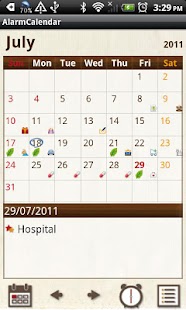
Alarm is repeatable so you can save monthly money transfer, regular meetings, dog-walking, trash day, cram school, Gym and culture lessons etc...You can set volume and alarm sound from "Alarm" button of Menu.When Todo is saved, "Leaf" mark will be displayed on the date of the calendar.
You can understand at one view that you have saved something on that date.
*From the left button*1.
"Today" button: Go back to the todays date.2.
"Left" & "Right" button: Move the date right and left.3.
"Alarm Setting" button: Move to the Alarm Setting screen and register Todo .
4.
"List" button: You can see the list of Memo.
1.
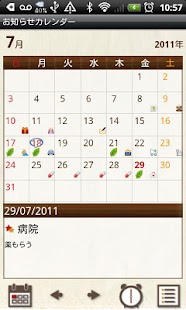
Mark on the date: When you save a Todo, "Leaf" mark will be displayed on the date.
"Blue circle" will be appeared on today's date.2.
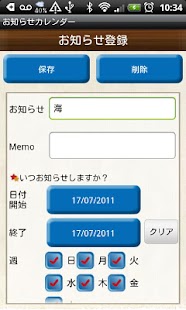
Tap "Enter notifications!" → move to the Memo (Todo) Registration screen.
Enter memo and save → go back to the calendar automatically.3.
You can confirm the memo saved in the list of the calendar.
Tap one of the memos → move to the Memo (Todo) Registration screen.
→ check the checkbox if you have done the Todo.
By doing so, you can see at one view on the calendar if you have done it or not.
1.
Press "Alarm Setting" button on the calendar.
→ move to the Alarm Setting screen.2.
Press "New" button → enter the notification's content, select the week and specified days → Press "Save".3.
You can confirm the saved content in the list.
Press "Back" button of the mobile to go back to the calendar.
1.
"Setting": You can customize your calendar.2.
"Password": Set a password.3.
"Mark": You can add marks on the date of the calendar.
* You can delete the mark by selecting the same mark and tap twice.4.
"Alarm": Set volume and alarm sound.
About AlarmCalendar(TODO,Reminder)
- Package name (App ID)
- info.androidx.alarmcalen
- Available on
- Google Play
- Price
- Free
- Version
- v1.0.9
- Developer
- GalleryApp
Looking for the AlarmCalendar(TODO,Reminder) APK?
The safest way to get AlarmCalendar(TODO,Reminder) (info.androidx.alarmcalen) on your Android device is to install it directly from Google Play — you'll always get the latest official version, automatic updates, and no risk of modified or infected APK files from third-party sites.
Music Features
Enjoy high-quality music streaming and playback features.
Gaming Features
Enjoy immersive gaming experience with various game modes.
Productivity Tools
Boost your productivity with powerful tools and features.
See AlarmCalendar(TODO,Reminder) in Action
Frequently Asked Questions
Is AlarmCalendar(TODO,Reminder) free?
Yes, AlarmCalendar(TODO,Reminder) is free to download and install on Android through Google Play.
How do I install AlarmCalendar(TODO,Reminder) on Android?
Open Google Play on your Android phone or tablet, search for AlarmCalendar(TODO,Reminder) by GalleryApp or tap the Google Play button on this page, then tap Install. The app downloads and installs automatically.
What is info.androidx.alarmcalen?
info.androidx.alarmcalen is the App ID (package name) of AlarmCalendar(TODO,Reminder) on Google Play. Every Android app has a unique package name, and it is the safest way to verify you are installing the official app.
Is AlarmCalendar(TODO,Reminder) safe to download?
Installing AlarmCalendar(TODO,Reminder) from Google Play is the safest option: you get the official version published by GalleryApp, verified by Google Play Protect, with automatic updates. Avoid APK files from unofficial third-party sites.
Get AlarmCalendar(TODO,Reminder) Today
AlarmCalendar(TODO,Reminder) for Android — free download on Google Play.
Compatible with Android phones and tablets — available on Google Play.
Ask AI about this app
Get instant answers about features, tips and more from popular AI assistants.